PRSU Result 2025-2026 | Check BA, BSC, BCom, MA, MSC Semester Results at Prsu.ac.in
Pandit Ravishankar Shukla University (PRSU), Raipur declares examination results for all UG, PG, Diploma, and Professional courses through its official website at www.prsu.ac.in. Students who appeared for the semester or annual examinations can check their PRSU results online by entering their roll number on the result portal.
The university publishes results through multiple portals including the main website result section at prsu.ac.in/examination/result/more-result and the online result portal at exam.prsuuniv.in/prsuresult. PRSU is the largest and oldest institution of higher education in Chhattisgarh, established in 1964 and named after the first Chief Minister of erstwhile Madhya Pradesh.
This page covers the latest PRSU result notifications, PRSU login details, result checking process for 1st and 2nd semester, PRSU notifications, and all important links for students.
PRSU Result 2025-2026 – Latest Notifications
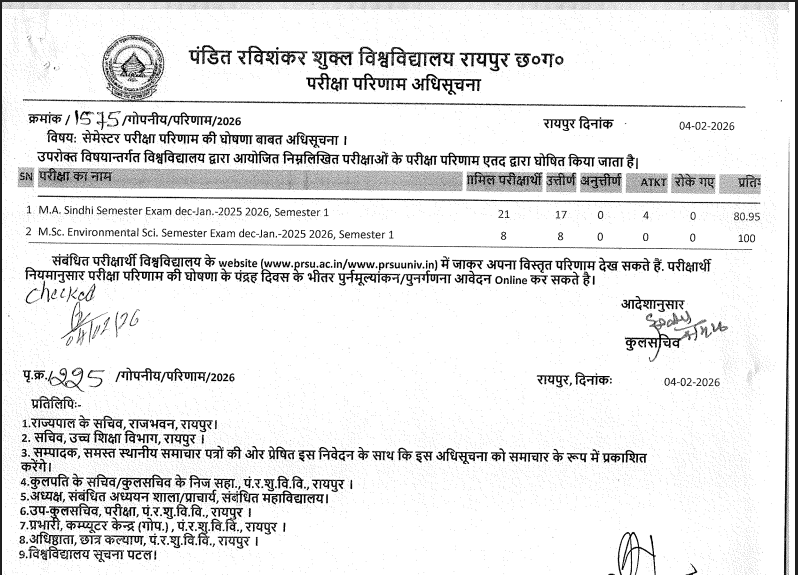
Pandit Ravishankar Shukla University declares results for semester and annual examinations of UG and PG courses on a rolling basis. The university conducts odd semester examinations (Sem I, III, V) from November to December and even semester examinations (Sem II, IV, VI) from May onwards. Annual examinations for certain courses are conducted in March/April. Results are typically declared within 1 to 2 months after the completion of examinations. The following table lists recent notifications and result updates from the official PRSU website.
| Notification | Category | Status | Link |
|---|---|---|---|
| PRSU Result 2025 declared for B.Ed, B.Voc, BBA, MA, MSc 1st, 2nd, 4th and 6th Semester | UG/PG Semester Result | Declared | Check Here |
| PRSU Result 2025 declared for BSc, B.Ed, BCom, MA, MCA, MSc, M.Ed 1st and 2nd Semester | UG/PG Semester Result | Declared | Check Here |
| PRSU BA, BCom, BSc Annual/Semester Results for Session 2024-25 | UG Annual/Semester Result | Declared | Check Here |
| PRSU MA, MSc, MCom Semester Results for Session 2024-25 | PG Semester Result | Declared | Check Here |
| PhD Coursework Examination 2024-25 | Ph.D Notice | Published | Check Here |
| B.A.LL.B. Admission Counselling Notice 2025 | Admission Notice | Published | Check Here |
| Admission open in New Courses for Session 2025-26 (MA Tribal Studies, MA Women & Gender Studies, MA Yoga, Diploma in Sanskrit, Diploma in AI) | Admission Notice | Published | Check Here |
| CG Green Summit 2025 – PRSU Raipur | Event | Published | Check Here |
| Revised Date Sheet – M.Lib.I.Sc. 1st Semester (rescheduled to 27 January 2026) | Date Sheet | Published | Check Here |
For the complete and updated list of all result notifications, students should visit the PRSU result page at www.prsu.ac.in/examination/result/more-result. The homepage ticker at www.prsu.ac.in also displays the latest notifications in a scrolling banner.
Check Your PRSU Result
PRSU provides examination results through multiple portals. The main result page on the official website lists all declared results with downloadable links. The separate online result portal at exam.prsuuniv.in allows students to search results using their roll number. Students need their examination roll number to access individual results on the online portal.
| Portal | Link | Credentials Required |
|---|---|---|
| PRSU Result Page (Main Website) | prsu.ac.in/examination/result/more-result | Browse and select result link |
| PRSU Online Result Portal | exam.prsuuniv.in/prsuresult | Roll Number + Captcha |
| PRSU Student Portal (Annual Result) | prsuuniv.in | Roll Number |
| PRSU Academic Portal (Login) | academic.prsu.ac.in | Student Login credentials |
PRSU Quick Highlights
| Particulars | Details |
|---|---|
| University Full Name | Pandit Ravishankar Shukla University (PRSU) |
| Also Known As | Pt. Ravishankar Shukla University / Raipur University |
| Established | 1964 |
| Named After | Pandit Ravishankar Shukla, first Chief Minister of Madhya Pradesh |
| Location | Amanaka, G.E. Road, Raipur, Chhattisgarh – 492010 |
| University Type | State Public University (Chhattisgarh) |
| Campus Area | 207 acres (300+ acres including extensions) |
| Recognition | UGC recognized, NAAC Grade A+, NIRF Ranked (51-100 State Public Universities) |
| Funding | DST-PURSE and ANRF-PAIR Funded University |
| Teaching Departments | 29 departments |
| Affiliated Colleges | 180+ colleges and institutions across 11 districts of Chhattisgarh |
| Enrolled Students | Approximately 1,50,000 |
| Faculty Members | 180+ faculty members |
| Official Website | www.prsu.ac.in |
| Result Portal | exam.prsuuniv.in/prsuresult |
| Student Portal | prsuuniv.in |
| Helpdesk Contact | +91-9304963349 / 7091874603 (10 AM to 6 PM) |
| Helpdesk Email | prsuunivhelpdesk@gmail.com |
PRSU Result – Course-wise Details 2025-2026
Pandit Ravishankar Shukla University offers a full range of UG, PG, Diploma, and Doctoral programmes through its 29 teaching departments and 180+ affiliated colleges across 11 districts of Chhattisgarh. The university follows both semester and annual examination patterns depending on the course. Results are declared for all course categories including regular, private, non-college, and ex-students.
UG Course Results
| Course | Faculty | Exam Pattern |
|---|---|---|
| BA (Bachelor of Arts) | Humanities | Semester (Sem I to VI) / Annual |
| BSc (Bachelor of Science) | Science | Semester (Sem I to VI) / Annual |
| BCom (Bachelor of Commerce) | Commerce | Semester (Sem I to VI) / Annual |
| BCA (Bachelor of Computer Application) | Computer Science | Semester (Sem I to VI) |
| BBA (Bachelor of Business Administration) | Management | Semester (Sem I to VI) |
| B.Ed (Bachelor of Education) | Education | Semester (Sem I to IV) |
| B.Voc (Bachelor of Vocation) | Vocational | Semester (Sem I to VI) |
| BA LLB (Integrated Law) | Law | Semester (5-year programme) |
| B.Pharm (Pharmacy) | Pharmacy | Semester (Sem I to VIII) |
| B.P.Ed (Physical Education) | Physical Education | Semester |
| B.Lib.I.Sc (Library Science) | Library Science | Semester/Annual |
PG Course Results
| Course | Faculty | Exam Pattern |
|---|---|---|
| MA (Master of Arts) | Humanities (Hindi, English, History, Economics, Psychology, Sociology, Political Science, Geography, Philosophy, Education, Linguistics, Anthropology and more) | Semester (Sem I to IV) |
| MSc (Master of Science) | Science (Physics, Chemistry, Mathematics, Botany, Zoology, Geology, Electronics, Statistics, Biochemistry, Biotechnology, Environmental Science and more) | Semester (Sem I to IV) |
| MCom (Master of Commerce) | Commerce | Semester (Sem I to IV) |
| MBA (Master of Business Administration) | Management | Semester (Sem I to IV) |
| MCA (Master of Computer Application) | Computer Science | Semester (Sem I to IV) |
| M.Ed (Master of Education) | Education | Semester (Sem I to IV) |
| LLM (Master of Laws) | Law | Semester |
| M.Lib.I.Sc (Library Science) | Library Science | Semester |
| M.Pharm (Pharmacy) | Pharmacy | Semester |
| M.Tech | Technology | Semester |
| Ph.D. (Coursework) | All Faculties | Coursework Examination |
Diploma Course Results
PRSU also offers various diploma programmes including Diploma in English, Diploma in Russian, Diploma in French, Diploma in German, Diploma in Sindhi Language, Diploma in Sanskrit, Diploma in Artificial Intelligence, DCA (Diploma in Computer Application), PGDCA, and other PG Diploma programmes. Results for diploma courses are declared on the same result portal.
PRSU Result 1st Semester – How to Check
PRSU 1st semester results are declared for students who have taken admission in the new academic session. The odd semester (Sem I) examinations for UG courses are typically conducted from November to December, and for PG courses from November onwards as per the academic calendar. The 1st semester results are among the most awaited as they mark the beginning of the university examination journey for freshly admitted students.
To check PRSU result for 1st semester, students need to visit the official result portal and enter their roll number. The 1st semester results are available for all courses including BA Sem I, BSc Sem I, BCom Sem I, BCA Sem I, BBA Sem I, MA Sem I, MSc Sem I, MCom Sem I, and other programmes. The result is typically declared by December-end or January of the following year for the odd semester session.
PRSU Result 2nd Semester
PRSU 2nd semester examinations (even semester) for UG and PG courses are conducted from May onwards. The 2nd semester results are typically declared between June and September. Students who appeared for BA Sem II, BSc Sem II, BCom Sem II, BCA Sem II, MA Sem II, MSc Sem II, MCom Sem II, and other even semester examinations can check their results once declared.
The process for checking 2nd semester results is the same as the 1st semester. Students need to visit the PRSU result portal at exam.prsuuniv.in/prsuresult or the main website result section, enter their roll number and submit to view the result.
How to Check PRSU Result 2026?
- Visit the PRSU official website at www.prsu.ac.in
- Look for the Examination tab on the homepage navigation menu
- From the dropdown, select Result and then click on More Result
- Alternatively, go directly to prsu.ac.in/examination/result/more-result
- Find the result link for your course, semester, and session (e.g., Main/Semester Examination – Session 2024-25)
- Click on the result link to open the result login page
- Enter your Roll Number and the security captcha
- Click Submit to view your result and marksheet
- Download and take a printout of the result for your records
Method 2 – Through PRSU Online Result Portal
- Visit the PRSU online result portal at exam.prsuuniv.in/prsuresult
- Select the appropriate examination type (Semester Examination / Annual Examination / Revaluation Result)
- Enter your Roll Number in the search field
- Click Submit to view your result
- Download the marksheet for future reference
Method 3 – Through PRSU Student Portal
- Visit the PRSU student portal at prsuuniv.in
- Navigate to the Result section
- Select Annual or Semester result as applicable
- Enter your Roll Number and search
- View and download your result
PRSU Login – Student and Academic Portal
PRSU maintains several online portals for student services including examination, admissions, and academic activities. The PRSU login is required for accessing individual student services such as examination forms, admit cards, results, and revaluation applications. Below are the key PRSU login portals.
| Portal | URL | Purpose |
|---|---|---|
| PRSU Academic Portal Login | academic.prsu.ac.in/admin/site/login | Student academic services, examination forms, admit card |
| PRSU Exam Form Login | exam.prsuuniv.in/prsuform/login | Exam form submission, revaluation reports |
| PRSU Result Portal | exam.prsuuniv.in/prsuresult | Check semester and annual results |
| PRSU Student Portal | prsuuniv.in | Student services and results |
| Samarth eGov Portal | Accessible through prsu.ac.in | University ERP and governance |
| PRSU LMS (Learning Management System) | Accessible through prsu.ac.in | Online learning and course materials |
Students are advised to use their own mobile number and email ID during registration, as the university sends important notifications and information through these channels. The helpdesk for login-related issues can be reached at +91-9304963349 / 7091874603 (between 10 AM to 6 PM) or via email at prsuunivhelpdesk@gmail.com.
PRSU Notification – Latest Updates
PRSU publishes various notifications related to examinations, admissions, results, and academic activities on its official website. The university has a dedicated notice board and examination notice section. Below are the key notification pages on the PRSU website that students should monitor regularly.
| Notification Type | Where to Find |
|---|---|
| Examination Notifications | prsu.ac.in/examination/exam/examination-notice |
| General Notifications / Notice Board | prsu.ac.in/notice-board |
| Result Notifications | prsu.ac.in/examination/result/more-result |
| Homepage Ticker (Latest Updates) | www.prsu.ac.in (scrolling banner) |
Recent PRSU notifications include the CG Green Summit 2025 at PRSU Raipur, PhD Coursework Examination 2024-25, BA LLB Admission Counselling Notice 2025, new course admissions for session 2025-26 (MA in Tribal Studies and Indian Knowledge System, MA in Women and Gender Studies, MA in Yoga, Diploma in Sanskrit, and Diploma in Artificial Intelligence), revised date sheets, and various examination-related notices. Students should check the notification pages frequently as the university regularly updates these sections.
Details on PRSU Marksheet
The PRSU marksheet contains the student’s academic performance details. The results published online are for immediate information and are provisional in nature. The original marksheets are issued by the university separately and only those should be considered as authentic documents for any official purpose. Students should verify all details on the marksheet carefully.
| Field | Description |
|---|---|
| University Name | Pandit Ravishankar Shukla University, Raipur |
| Student Name | Full name as per university records |
| Roll Number | Examination roll number |
| Date of Birth | As registered with the university |
| Course and Semester/Year | Programme name with semester or year details |
| Subject Name and Code | Individual subject details |
| Subject-wise Marks | Marks obtained in each subject |
| Total Obtained Marks | Aggregate marks across all subjects |
| Minimum Qualifying Marks | Minimum marks required to pass |
| Result Status | Pass / Fail / Supplementary |
| Remarks | Additional information if any |
PRSU Revaluation / Retotalling Process
Students who are not satisfied with their PRSU examination results can apply for revaluation or retotalling of their answer sheets. The university provides an online facility for submitting revaluation/retotalling applications through the examination portal.
| Particulars | Details |
|---|---|
| Application Mode | Online through exam.prsuuniv.in/prsuform/login |
| Application Deadline | Within the stipulated time after result declaration (as notified by university) |
| Revaluation Result | Available through the examination portal after processing |
| Retotalling | Checking of marks totalling and whether all answers have been evaluated |
| Supplementary Exam | Students who fail must fill the supplementary exam form for re-appearing |
How to Apply for PRSU Revaluation?
- Visit the PRSU examination form portal at exam.prsuuniv.in/prsuform/login
- Login with your credentials
- Select the Revaluation/Retotalling option
- Choose the paper(s) for which you want to apply
- Pay the prescribed fee online
- Submit the application and save the acknowledgment
- The revaluation result will be published on the examination portal after processing
PRSU Examination Schedule and Pattern
PRSU follows both semester and annual examination patterns. The academic calendar for session 2024-25 outlines the following general examination schedule. Note that specific dates may vary each year and students should check the official examination notices for exact dates.
| Activity | Odd Semester (I/III/V) | Even Semester (II/IV/VI) |
|---|---|---|
| Classes Begin | July | January |
| Teaching Completed | November | April |
| Practical Examinations | November (2nd fortnight) | April (2nd fortnight) |
| Theory Examinations | November-December | May onwards |
| Result Declaration | By December-end / January | By June / July |
For annual examination pattern courses, examinations are typically conducted in March/April with results declared by June/July. The PhD Coursework Examination is conducted in February-March.
Important Links for PRSU Students
| Purpose | Link |
|---|---|
| PRSU Official Website | www.prsu.ac.in |
| PRSU Result Page (More Result) | prsu.ac.in/examination/result/more-result |
| PRSU Online Result Portal | exam.prsuuniv.in/prsuresult |
| PRSU Student Portal | prsuuniv.in |
| PRSU Academic Portal Login | academic.prsu.ac.in |
| PRSU Exam Form / Revaluation Login | exam.prsuuniv.in/prsuform/login |
| Examination Notices | prsu.ac.in/examination/exam/examination-notice |
| Notice Board | prsu.ac.in/notice-board |
| PRSU Policy | prsu.ac.in/policy-prsu |
| ABC ID Verification | Accessible through prsu.ac.in |
| University LMS | Accessible through prsu.ac.in |
| Samarth eGov Portal | Accessible through prsu.ac.in |
| UGC e-Samadhaan | Accessible through prsu.ac.in |
| IDP 2025-2035 | Accessible through prsu.ac.in |
| Public Self Disclosure | Accessible through prsu.ac.in |
| Helpdesk Contact | +91-9304963349 / 7091874603 (10 AM to 6 PM) |
| Helpdesk Email | prsuunivhelpdesk@gmail.com |
Frequently Asked Questions (FAQs)
How to check PRSU result online at www.prsu.ac.in?
Visit www.prsu.ac.in and navigate to Examination followed by Result and then More Result. Find the result link for your course and session, click on it, enter your roll number and captcha code, and click submit to view your result. Alternatively, visit the online result portal at exam.prsuuniv.in/prsuresult directly to search results by roll number.
How to check PRSU result for 1st semester?
PRSU 1st semester (Sem I) results are declared after the odd semester examinations conducted in November-December. Visit the PRSU result page at prsu.ac.in/examination/result/more-result, look for the 1st semester result link for your course (BA/BSc/BCom/MA/MSc etc.) and session, enter your roll number, and submit. Results are typically declared by December-end or January.
How to check PRSU result for 2nd semester?
PRSU 2nd semester (Sem II) examinations are conducted from May onwards. Visit the same result portals – either prsu.ac.in/examination/result/more-result or exam.prsuuniv.in/prsuresult, select the 2nd semester result link for your course, enter your roll number, and submit. Even semester results are generally declared between June and September.
How to login to PRSU student portal?
PRSU has multiple login portals. For academic services, visit academic.prsu.ac.in. For examination forms and revaluation, visit exam.prsuuniv.in/prsuform/login. Login with the credentials provided during registration. For login issues, contact the helpdesk at +91-9304963349 or email prsuunivhelpdesk@gmail.com.
Where to find PRSU notifications?
PRSU notifications are published at multiple locations on the official website. Examination-related notifications are available at prsu.ac.in/examination/exam/examination-notice. General notifications and circulars are posted on the notice board at prsu.ac.in/notice-board. The homepage at www.prsu.ac.in also displays the latest notifications in a scrolling banner at the top of the page.
What is the passing criteria for PRSU examinations?
A student is considered to have passed the PRSU university examination if they secure the minimum qualifying marks in each and every subject. The minimum passing marks vary by course. Students who fail in one or more subjects need to fill the supplementary examination form to re-appear in those subjects in the next examination session.
How to apply for PRSU revaluation?
Visit the PRSU examination form portal at exam.prsuuniv.in/prsuform/login, login with your credentials, select revaluation/retotalling, choose the papers, pay the fee online, and submit. The revaluation result is published on the portal after processing. The university administration can view the revaluation/retotalling report from the same portal.
What is the PRSU exam form fee?
The PRSU examination form fee is Rs. 1,000 for general category students. The fee may vary for other categories and specific examinations. Students should check the latest fee structure on the official examination notice page before filling the form.