Sardar Patel University Results 2025-2026 | Check SPU Balaghat Result, Login & Marksheet at Spubgt.ac.in
Sardar Patel University (SPU), Balaghat declares examination results for all UG, PG, Diploma, and Professional courses through the University Management System (ERP) portal accessible from its official website at spubgt.ac.in. Students who appeared for semester examinations can check their Sardar Patel University results online by logging in to the student portal at universitymanagementsystem.in/spump using their User ID and Password.
Sardar Patel University Balaghat is a State Private University established under the Madhya Pradesh Niji Vishwavidyalaya Act 2011 (Act No. 26 of 2011), with the Governor’s assent received on 23rd July 2018. This page covers the latest SP University result notifications, SPU login process, result marksheet download, and all important links for students of Sardar Patel University Balaghat.
Sardar Patel University Balaghat Result 2025-2026 – Latest Notifications
Sardar Patel University conducts semester examinations for all its courses and declares results on the University Management System (ERP) portal. The university operates as a unitary campus and does not grant affiliations to other colleges. All results are published through the student login portal. The following table lists recent result and examination notifications from the official SPU Balaghat website.
| Notification | Category | Status | Click Here |
|---|---|---|---|
| BAMS Notification Merit List – Stray Vacancy Round-III | Medical (BAMS) | Published | Click Here |
| BAMS Notification Merit List – Stray Vacancy Round-II | Medical (BAMS) | Published | Click Here |
| BHMS Notification | Medical (BHMS) | Published | Click Here |
| Online Admission Open for Session 2025-26 | Admission | Open | Click Here |
| Ph.D. Notification | Research | Published | Click Here |
| Convocation 2025 | Convocation | Published | Click Here |
| Campus Connect Mobile App Released | Student Services | Available on Google Play | Click Here |
For the complete and updated list of all notifications, students should visit the official SPU Balaghat website at spubgt.ac.in. The homepage displays the latest notifications and announcements in the scrolling banner section. Notices are also available at spubgt.ac.in/notices.
Check Your Sardar Patel University Result
Sardar Patel University Balaghat publishes all examination results through the University Management System (ERP/Student Portal). Unlike many other universities that publish result PDFs on a separate results page, SPU Balaghat requires students to log in to their individual student accounts to view and download their results and marksheets. The Results link on the university homepage directly redirects to the student login portal.
| Portal | Link | Credentials Required |
|---|---|---|
| SPU Student Login / ERP Portal | universitymanagementsystem.in/spump | User ID + Password |
| SPU Balaghat ERP (Alternate Link) | spubgt.ac.in/erp | User ID + Password |
| SPU Result Page (Old Portal) | spubgt.ac.in/spu/result.php | Student Login credentials |
| Online Admission Portal | universitymanagementsystem.in (Registration) | New student registration |
Sardar Patel University Balaghat – Quick Highlights
| Particulars | Details |
|---|---|
| University Full Name | Sardar Patel University (SPU) |
| Named After | Sardar Vallabhbhai Patel (Iron Man of India) |
| Established | 2018 (Governor’s assent on 23 July 2018) |
| Governing Act | Madhya Pradesh Niji Vishwavidyalaya (Sthapana Avam Sanchalan) Sanshodhan Adhiniyam, 2011 (MP Act No. 26 of 2011) |
| University Type | State Private University (Madhya Pradesh) |
| Location | Sardar Patel Knowledge City, Waraseoni Road, Dongariya, Balaghat (M.P.) – 481331 |
| Sponsoring Body | Vindhya Shiksha Samiti, Sardar Patel Campus, Gaykhuri, Balaghat |
| Chancellor | Shri Diwakar Singh (Chairperson, Vindhya Shiksha Samiti) |
| Campus Type | Unitary Campus (does not grant affiliations) |
| Approvals | UGC enlisted, PCI, NCTE, BCI, INC, NCISM, NCH, MP Paramedical Council (as applicable) |
| Total Courses | 72+ Degree programmes |
| Student Intake | 664+ seats across all courses |
| Official Website | spubgt.ac.in |
| Student Portal / ERP | universitymanagementsystem.in/spump |
| General Helpline | +91-9174202111, +91-9174192111, +91-9174212111 |
| info@spubgt.ac.in | |
| Industry Partners | L&T Edutech, Oracle Academy, STL, RedHat, NSE |
Sardar Patel University Results – Course-wise Details 2025-2026
Sardar Patel University Balaghat offers a wide range of UG, PG, Diploma, and Doctoral programmes through its 14 schools and constituent colleges. The university covers disciplines including Engineering, Pharmacy, Agriculture, Medical (Ayurveda and Homeopathy), Nursing, Paramedical, Education, Law, Commerce, Management, Science, Computer Applications, Arts, and Social Sciences. Results are declared for all courses on the student login portal after each semester examination.
Schools and Constituent Units
| School / Constituent Unit | Key Courses |
|---|---|
| School of Engineering and Technology | B.E. / B.Tech (CSE, ME, CE, EE, ECE), M.Tech |
| School of Agriculture Science Technology and Research | B.Sc Agriculture, M.Sc Agriculture |
| School of Pharmaceutical Science and Research | B.Pharm, M.Pharm, D.Pharm |
| Institute of Pharmaceutical Science and Research | B.Pharm, D.Pharm |
| Sardar Patel Ayurvedic Medical College and Hospital | BAMS (Bachelor of Ayurvedic Medicine and Surgery) |
| Sardar Patel College of Pharmacy | B.Pharm, D.Pharm |
| Sardar Patel College of Nursing | B.Sc Nursing, GNM |
| School of Paramedical Education | Paramedical Diploma and Degree courses |
| School of Education | B.Ed, B.Ed Special Education (I.D.), M.Ed, D.El.Ed |
| Sardar Patel College of Technology | Polytechnic Diploma courses |
| School of Commerce and Management | BBA, MBA, B.Com, M.Com |
| School of Science and Computer Application | B.Sc, M.Sc, BCA, MCA, PGDCA |
| School of Legal Studies and Research | BA LLB (5-year Integrated), LLB (3-year), LLM |
| School of Arts and Social Science | BA (NEP), MA, MSW, MSW (HR) |
UG Course Results
| Course | Duration | Semesters |
|---|---|---|
| BA (NEP) | 3 Years | Sem I to VI |
| B.Sc | 3 Years | Sem I to VI |
| B.Com | 3 Years | Sem I to VI |
| BBA | 3 Years | Sem I to VI |
| BCA | 3 Years | Sem I to VI |
| B.E. / B.Tech | 4 Years | Sem I to VIII |
| B.Pharm | 4 Years | Sem I to VIII |
| BAMS | 5.5 Years (incl. internship) | As per NCISM |
| B.Sc Nursing | 4 Years | Sem I to VIII |
| B.Sc Agriculture | 4 Years | Sem I to VIII |
| BA LLB (Integrated) | 5 Years | Sem I to X |
| LLB | 3 Years | Sem I to VI |
| B.Ed | 2 Years | Sem I to IV |
| B.Ed Special Education (I.D.) | 2 Years | Sem I to IV |
| B.Voc | 3 Years | Sem I to VI |
| B.Arch (Bachelor of Architecture) | 5 Years | Sem I to X |
| D.Pharm | 2 Years | Annual/Semester |
| D.El.Ed | 2 Years | Annual/Semester |
PG and Doctoral Course Results
| Course | Duration | Semesters |
|---|---|---|
| MA (Master of Arts) | 2 Years | Sem I to IV |
| M.Sc | 2 Years | Sem I to IV |
| M.Com | 2 Years | Sem I to IV |
| MBA | 2 Years | Sem I to IV |
| MCA | 2 Years | Sem I to IV |
| M.Tech | 2 Years | Sem I to IV |
| M.Pharm | 2 Years | Sem I to IV |
| LLM | 2 Years | Sem I to IV |
| M.Ed (2 Year) | 2 Years | Sem I to IV |
| M.Ed Special Education (I.D.) | 2 Years | Sem I to IV |
| MSW (Master of Social Work) | 2 Years | Sem I to IV |
| MSW (HR) | 2 Years | Sem I to IV |
| PGDCA | 1 Year | Sem I to II |
| Ph.D. | 3-6 Years | Coursework + Research |
SPU Login – How to Login to Sardar Patel University Student Portal
The SPU login portal is the primary gateway for Sardar Patel University Balaghat students to access their academic records, examination results, marksheets, admit cards, and other student services. The university uses the University Management System (UMS) as its ERP portal. All examination results are published exclusively through this student login system.
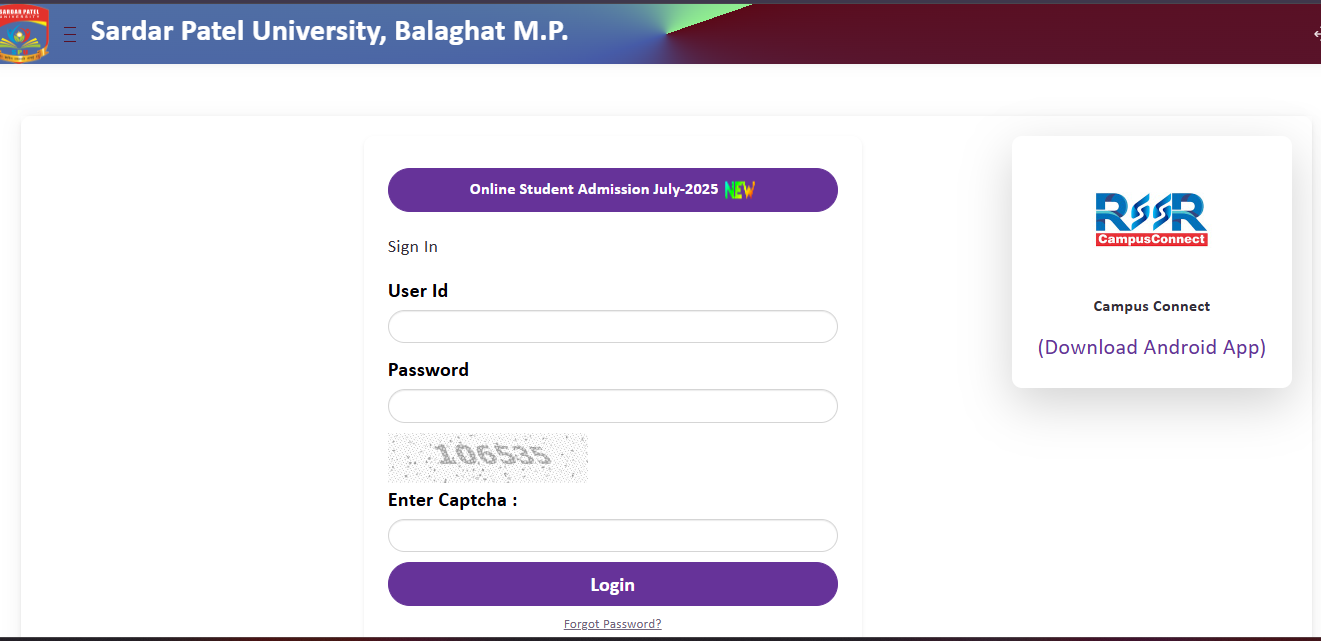
Steps to Login to SPU Balaghat Student Portal
- Visit the SPU ERP portal at universitymanagementsystem.in/spump or through spubgt.ac.in/erp
- On the login page, you will see the Sign In form for Sardar Patel University, Balaghat M.P.
- Enter your User ID (provided at the time of admission)
- Enter your Password
- Click the Sign In button to access your student dashboard
- Navigate to the Results section within your dashboard to view your semester results and marksheet
If you have forgotten your password, use the Forgot Password option available on the login page. For new students who need to activate their portal, use the Portal Activation option. For any login-related technical issues, contact the university helpline at +91-9174202111 or email info@spubgt.ac.in.
Sardar Patel University Result Login – Step by Step Guide
To check your Sardar Patel University result and download your marksheet, you need to login to the student portal. The result is available only after the university declares it for your specific course and semester. Here is the detailed process for accessing your SP University result.
- Open your web browser and visit universitymanagementsystem.in/spump
- Enter your User ID and Password on the Sign In page
- After successful login, you will see your student dashboard with various options
- Locate and click on the Results or Examination Results section
- Select the relevant semester and examination session
- Your result with subject-wise marks, total marks, and result status will be displayed
- Click on Download or Print to save your marksheet as a PDF
- Take a printout of the result marksheet for your records
Students can also access the result through the Campus Connect mobile app available on Google Play Store. The app provides convenient access to academic records, results, and university notifications on mobile devices.
SP University Result Marksheet – Details
The Sardar Patel University result marksheet available on the student portal contains the academic performance details for each semester examination. The online marksheet is available for immediate information to students. Students should collect the original printed marksheet from the university for official use. The marksheet contains the following details.
| Field | Description |
|---|---|
| University Name | Sardar Patel University, Balaghat |
| Student Name | Full name as per admission records |
| Enrollment Number | Unique enrollment/registration number |
| Course and Semester | Programme name with semester details |
| Examination Session | Month and year of examination |
| Subject Name and Code | Individual subject details |
| Internal Assessment Marks | Marks from internal evaluation |
| External/Theory Marks | Marks from semester theory examination |
| Practical Marks | Marks from practical examination (where applicable) |
| Total Marks | Combined marks for each subject |
| Grade/Grade Point | Grade and grade points earned |
| SGPA/CGPA | Semester and Cumulative Grade Point Average |
| Result Status | Pass / Fail / Supplementary |
Students are advised to verify all details on the marksheet carefully. In case of any discrepancy, contact the Examination Branch of the university immediately. The original printed marksheet should be collected from the university after the online result is declared.
How to Check Sardar Patel University Balaghat Result
Method 1 – Through SPU ERP Student Login Portal
- Visit universitymanagementsystem.in/spump
- Sign in with your User ID and Password
- Go to Results section in your dashboard
- Select the semester and examination session
- View and download your result marksheet
Method 2 – Through SPU Official Website
- Visit the official website at spubgt.ac.in
- Click on the Results link on the homepage (it will redirect to the ERP portal)
- Alternatively, navigate to Examination and then Results from the menu
- Login with your student credentials on the ERP portal
- Access your results from the student dashboard
Method 3 – Through Campus Connect Mobile App
- Download the Campus Connect app from Google Play Store
- Login with your SPU student credentials
- Navigate to the Results section within the app
- View your semester results on your mobile device
Revaluation Process at Sardar Patel University Balaghat
Students who are not satisfied with their examination results can apply for revaluation of answer books at Sardar Patel University. The revaluation process involves observation of the evaluated answer sheet. Below are the key details of the revaluation process.
| Particulars | Details |
|---|---|
| Application Mode | Through the Student Portal / University Office |
| Application Deadline | Within 10 days from the date printed on the marksheet |
| Process | Personal observation of answer book by the student |
| Original Marksheet | Available from the college/department concerned |
| Supplementary Exam | Students who fail can appear in supplementary examinations |
Important Links for SPU Balaghat Students
| Purpose | Link |
|---|---|
| SPU Official Website | spubgt.ac.in |
| SPU Student Login / ERP Portal (Results) | universitymanagementsystem.in/spump |
| SPU ERP (Alternate Link) | spubgt.ac.in/erp |
| Online Admission Registration | universitymanagementsystem.in (Registration) |
| Exam Schedule | spubgt.ac.in/exam-schedule |
| Entrance Exam Alert | spubgt.ac.in/entrance-exam-alert |
| Notices | spubgt.ac.in/notices |
| Events | spubgt.ac.in/events |
| Admission Notification | spubgt.ac.in/admission-notification |
| Fees Structure | spubgt.ac.in/fees-structure |
| Scheme and Syllabus | spubgt.ac.in/scheme-and-syllabus |
| Academic Calendar | spubgt.ac.in/academic-calendar |
| Ph.D. Notification | spubgt.ac.in/ph-d-notification |
| Convocation 2025 | spubgt.ac.in/convocation-2025 |
| Recognition and Approvals | spubgt.ac.in/recognition-approvals |
| Campus Connect Mobile App | Google Play Store |
| MPNVVA (MP Private University Regulatory Commission) | mpnvva.in (SPU Balaghat) |
| UGC Mandate | spubgt.ac.in/ugc-mandate |
| Sardar Patel Ayurvedic Medical College | spamc.in |
| General Helpline | +91-9174202111, +91-9174192111, +91-9174212111 |
| info@spubgt.ac.in |
Frequently Asked Questions (FAQs)
How to check Sardar Patel University Balaghat result?
Visit the SPU student login portal at universitymanagementsystem.in/spump and sign in with your User ID and Password. After login, navigate to the Results section in your student dashboard to view your semester result and download the marksheet. You can also access the portal through the Results link on the official website at spubgt.ac.in.
How to login to SPU Balaghat student portal?
Go to universitymanagementsystem.in/spump or spubgt.ac.in/erp. Enter your User ID and Password, then click Sign In. If you have forgotten your password, use the Forgot Password option on the login page. New students can activate their portal using the Portal Activation option. For technical issues, contact the helpline at +91-9174202111.
How to download SP University result marksheet?
Login to the student portal at universitymanagementsystem.in/spump, go to the Results section, select your semester and examination session, and your result with marksheet will be displayed. Use the Download or Print option to save the marksheet as a PDF. The online marksheet is for immediate reference – collect the original printed marksheet from the university for official purposes.
What if I forget my SPU login password?
Click on the Forgot Password link available on the SPU student login page at universitymanagementsystem.in/spump. Follow the steps to reset your password using your registered mobile number or email ID. If the issue persists, contact the university at +91-9174202111 or email info@spubgt.ac.in for assistance.
How to apply for revaluation at Sardar Patel University?
Apply for revaluation within 10 days from the date printed on the marksheet. Submit the prescribed application form to the university examination branch. The process involves personal observation of the evaluated answer book. If any change is found in marks, the student will receive an updated marksheet.
Is Sardar Patel University Balaghat affiliated to any other university?
No. Sardar Patel University Balaghat is an independent institution that operates as a unitary campus. It does not grant affiliations to any other institution and is not affiliated to any other university of a similar name in India. The university is established under the Madhya Pradesh State Legislature Act No. 26 of 2018 and is recognized by UGC.
What courses does Sardar Patel University Balaghat offer?
SPU Balaghat offers 72+ degree programmes across 14 schools and constituent units covering Engineering (B.E./B.Tech), Pharmacy (B.Pharm, D.Pharm, M.Pharm), Agriculture (B.Sc Agriculture), Medical (BAMS, BHMS), Nursing (B.Sc Nursing), Law (BA LLB, LLB, LLM), Education (B.Ed, M.Ed, D.El.Ed), Commerce and Management (BBA, MBA, B.Com, M.Com), Science and Computer Application (B.Sc, BCA, MCA, PGDCA), Arts and Social Science (BA NEP, MA, MSW), Architecture (B.Arch), and Doctoral programmes (Ph.D.).
Where can I find SPU Balaghat exam schedule and date sheet?
The examination schedule is published on the official website at spubgt.ac.in/exam-schedule. Students should check this page regularly for upcoming examination dates, entrance exam alerts, and any changes in the examination schedule. Notices related to examinations are also posted at spubgt.ac.in/notices.