ICSI CSEET 2026 Admit Card Released: How to Download Hall Ticket for January Session Exam
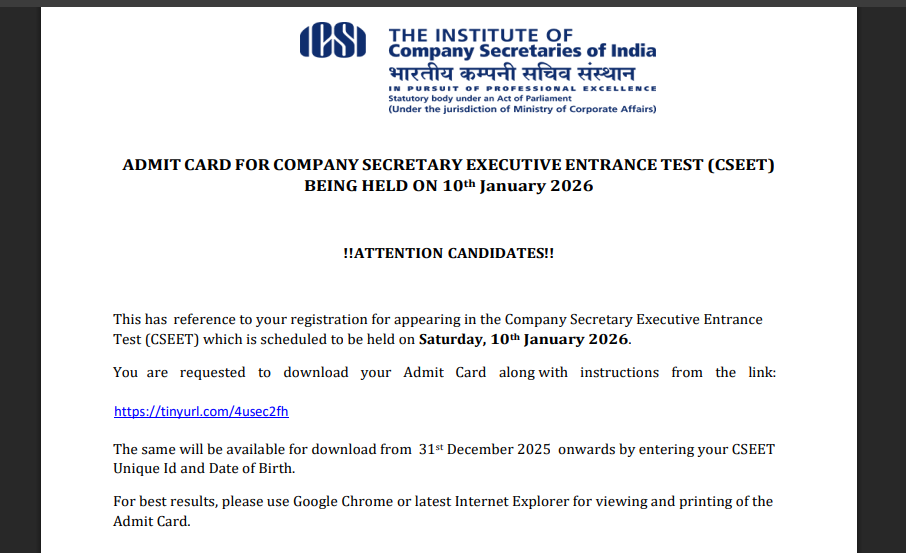
The Institute of Company Secretaries of India (ICSI) has officially released the CSEET 2026 Admit Card for candidates appearing in the January session examination. Students who have registered for the Company Secretary Executive Entrance Test (CSEET) scheduled for January 10, 2026 can now download their hall tickets directly from the official ICSI website.
The admit card was made available for download online from December 31, 2025, and candidates must use their unique CSEET ID and date of birth to access the document. This crucial document is mandatory for appearing in the exam and contains essential details for entry and verification on the day of the test.
ICSI CSEET 2026 Admit Card Release Date and Exam Details
The Institute of Company Secretaries of India (ICSI) has released the CSEET 2026 admit card for the January session examination on its official website. Registered candidates can download their hall tickets by logging in with their CSEET unique ID and date of birth.
The CSEET January 2026 exam is scheduled to be conducted in an online remote-proctored mode, allowing candidates to appear from their chosen location. The exam will assess knowledge in business communication, legal aptitude, economic and business environment, and current affairs. Candidates must carefully check all details mentioned on the admit card and follow the exam day instructions strictly.
How to Download ICSI CSEET 2026 Admit Card?
Candidates must follow the official process to ensure they obtain their admit card successfully. Here’s how to do it:
-
Visit the Official ICSI Website: Go to icsi.edu, the official portal for the Institute of Company Secretaries of India.
-
Locate the CSEET Section: On the homepage, navigate to the dedicated section for the Company Secretary Executive Entrance Test.
-
Click on the Admit Card Link: Look for the CSEET 2026 Admit Card link for the January exam.
-
Enter Login Credentials: Provide your CSEET Unique ID and Date of Birth to log in.
-
Download and Print: Once the admit card appears on the screen, download the PDF file and take a printed copy to carry to the exam.
Candidates are advised to carefully check all the information on the admit card, including name, photograph, exam date, time, and other relevant details. In case of any discrepancies, it is important to contact ICSI support immediately.
People Also Read



What’s on Your Hall Ticket?
The admit card serves as the official entry pass to the CSEET examination. It typically includes:
-
Candidate’s Full Name
-
Registration Number
-
Photograph and Signature
-
Exam Date and Time
-
Remote Proctoring Instructions
-
Guidelines and Reporting Instructions
Ensure all these details are correctly printed on your admit card before the exam day.
Exam Day: What to Expect
For the January session of CSEET 2026, the exam will be administered online in a remote-proctored format. This means candidates will need to:
-
Use a laptop or desktop with mandatory software (such as the Safe Exam Browser) installed.
-
Log in on time as per the reporting schedule provided on the admit card.
-
Keep the printed admit card and a valid ID document ready for verification.
Following all technical and procedural requirements beforehand is crucial to avoid last-minute hurdles. Remote proctoring uses real-time monitoring to ensure exam integrity, so candidates should familiarize themselves with the process in advance.
Final Preparations
With the admit card now available, aspirants must complete their final preparation and ensure they are well-versed with the exam pattern and guidelines. It’s recommended to download the admit card early, review all exam instructions, and check system requirements for the remote test environment.
Stay tuned to the official ICSI portal for any further updates regarding exam day advisories or support contacts ahead of the January 10, 2026, CSEET exam.




📰 More Education News
- NIOS April 2026 Exams Begin: Over 7,000 Centers Ready as Class 10 and 12 Theory Papers Kick OffApr 10, 2026 • Simran
- AP ICET Hall Ticket 2026 Releasing on April 15; Check Details HereApr 10, 2026 • Simran
- Anna University Extends TANCET 2026 Registration Deadline: Apply by April 15Apr 10, 2026 • Simran
- MP Board Ends “Supplementary” Stigma: Second Main Exam to Debut This MayApr 10, 2026 • Simran