REVA University Result 2026 – Check B.Tech, MBA, B.Arch Semester Results
As of 13 July 2026, REVA University has published the revaluation notifications for select B.Arch and B.Tech semesters on its official examination portal. The results for the Ph.D. entrance test conducted for the 2026-27 session are scheduled to be announced on 25 August 2026. Students awaiting their even semester (April/May 2026) results for various undergraduate (UG) and postgraduate (PG) courses can expect them to be released shortly. All results are primarily published on the RULMS student portal.
This page provides comprehensive information on all REVA University results, including semester-end examinations (regular and supplementary), re-evaluation outcomes, and entrance test results like REVA CET and REVA PET (Ph.D.). Students can find direct links to check their results and detailed guides on downloading grade sheets and applying for re-evaluation.
| Released On | Result Notification | Course / Degree | Check Result |
| Expected – 25 Aug 2026 | Ph.D. Admissions 2026–27 Entrance Examination Results | Ph.D. | Check Here |
| Expected – Aug 2026 | Semester End Examination Results (Even Semester 2026) | All UG/PG Courses | Check Here |
| Expected – July/Aug 2026 | REVA CET Results 2026 | UG & PG Programmes | Check Here |
| 13 July 2026 | Revaluation Notification 4th sem B Tech | B.Tech | View Notification |
| 13 July 2026 | Revaluation Notification 3rd to 9th sem B Arch | B.Arch | View Notification |
To access semester results, students must use their Student Registration Number (SRN) as the primary login credential. All academic results, including grade sheets and supplementary outcomes, are hosted on the REVA University Learning Management System (RULMS) portal at rulms.reva.edu.in.
How to Download Your REVA University Grade Sheet: A Step-by-Step Process
Once results are declared, students can view and download their official Semester Grade Sheet. This document is a formal record of academic performance. Follow these steps to access it:
- Visit the RULMS Portal: Open your web browser and navigate to the official REVA University result portal: https://rulms.reva.edu.in. This is the designated platform for all examination results.
- Enter Your Credentials: On the login page, you will be prompted to enter your Student Registration Number (SRN). You may also need to enter a password or date of birth as per the portal’s requirements.
- Navigate to the Results Section: After logging in, locate a tab or link labelled ‘Examination’, ‘Results’, ‘Grade Sheet’, or ‘Academic Performance’.
- Select the Examination/Semester: Choose the relevant semester and examination session (e.g., ‘Even Semester 2026’) for which you wish to view the result.
- View and Download: Your result will be displayed on the screen, detailing subject-wise grades, SGPA, and CGPA. Click on the ‘Download’ or ‘Print’ icon to save a PDF copy of your official grade sheet.
- Verify Details: After downloading, meticulously check all personal details (Name, SRN, Programme) and the grades on the sheet for any discrepancies.
REVA University’s Digital Examination Ecosystem
REVA University utilizes a network of online platforms to manage student academic activities. Understanding the purpose of each is key to accessing information efficiently.
- RULMS (Logisys) Portal: This is the primary portal for all examination-related activities. Students log in here to view semester results, download grade sheets, and check re-evaluation outcomes.
- REVA Student Portal: Accessible at
reva-university.my.site.com/StudentPortal/s/, this is a general-purpose portal for students to access information like timetables, hall tickets, and other academic resources. - REVA Student Portal Mobile App: Available on the Google Play Store, the official mobile app provides a convenient way to access results, notifications, and other university services directly on your smartphone. The university’s official FAQ confirms that results are made available on the mobile app alongside the web portal.
Information Displayed on the REVA University Grade Card
The online grade sheet is a comprehensive document. It is essential to verify that all information printed on it is accurate. Key details include:
- Name of the Student
- Student Registration Number (SRN)
- Programme and Branch of Study (e.g., B.Tech in Artificial Intelligence & Machine Learning)
- Semester and Academic Year
- List of Courses/Subjects with Course Codes
- Credits Assigned to Each Course
- Letter Grade Obtained in Each Course
- Semester Grade Point Average (SGPA)
- Cumulative Grade Point Average (CGPA)
- Result Status (Pass/Fail/Promoted)
- Date of Result Declaration
In case of any error in your personal details, contact the university’s Controller of Examinations office immediately for rectification.
Understanding Your Semester Performance: Grading & Passing Criteria
REVA University employs a 10-point grading system to evaluate student performance, which is represented by the Semester Grade Point Average (SGPA) and Cumulative Grade Point Average (CGPA).
REVA University Grading Scale
The university awards letter grades based on performance. Each letter grade has a corresponding grade point used for calculating SGPA and CGPA.
| Letter Grade | Description | Grade Points |
| O | Outstanding | 10 |
| A+ | Excellent | 9 |
| A | Very Good | 8 |
| B+ | Good | 7 |
| B | Above Average | 6 |
| C | Average | 5 |
| P | Pass | 4 |
| F | Fail | 0 |
| Ab | Absent | 0 |
Passing Criteria
To pass a course, a student must secure a minimum passing grade (typically ‘P’ or above) in both internal assessment and the semester-end examination components. A student who receives an ‘F’ grade in any subject is deemed to have failed that subject and must appear for a supplementary examination to clear the backlog.
Post-Result Procedures: Re-evaluation and Supplementary Exams
REVA University has a well-defined process for students who are unsatisfied with their results or have failed a subject.
Re-evaluation of Answer Scripts
Students who suspect an error in the evaluation of their answer scripts can apply for re-evaluation. This process is time-bound and requires strict adherence to deadlines.
- Monitor Notifications: The university releases an official re-evaluation notification on its examinations portal soon after results are declared. This document details the application window, fees per subject, and instructions. Typically, students have a window of up to 15 days from the result declaration to submit their application.
- Submit Online Application: Students must fill out an online application via the Request Form link on the exam portal. You will need to provide your SRN, the month and year of the exam, and select the specific subjects for re-evaluation.
- Pay the Fee: A non-refundable re-evaluation fee must be paid online for each subject through the payment gateway integrated with the application form.
- Await Results: The re-evaluation results are announced separately after a few weeks. The outcome can be an increase, decrease, or no change in marks. The final grade will be based on the better of the two scores (original vs. re-evaluated).
Supplementary Examinations
Students with an ‘F’ grade in one or more subjects can appear for supplementary (arrear) examinations to clear them.
- Eligibility: Any student with one or more ‘F’ grades is eligible to register for the supplementary exam for those subjects.
- Notification & Schedule: The schedule and registration details for supplementary exams are published in the ‘Notifications’ and ‘Circulars’ sections of the university’s examination website.
- Registration Process: Eligible students must register by filling out the specified application form and paying the examination fees before the deadline.
- Results: The results for supplementary exams are declared separately on the RULMS portal.
REVA University Entrance Exam Results 2026 (REVA CET & Ph.D.)
REVA University also declares results for its entrance examinations for admission into various programmes.
- REVA Common Entrance Test (REVA CET): This is the university’s entrance test for admissions to programmes like B.Tech, BBA, and MBA. The results, including ranks and scores, are announced on the main university website’s admissions section. Candidates check their results using their application number.
- Ph.D. Entrance Test (REVA PET): For doctoral programme admissions, the university conducts its own entrance test. The results, which include a list of candidates shortlisted for interviews, are published on the university’s official website. The Ph.D. entrance test result for the 2026-27 session is expected on August 25, 2026.
Academic Programs at REVA University
REVA University offers a diverse range of courses across multiple faculties. Results are declared for students enrolled in these programmes.
| Faculty / School | Key Programmes Offered |
| Engineering and Technology | B.Tech (Computer Science, AI & ML, Information Science, Electronics & Communication, Mechanical, Civil, Electrical & Electronics, Mechatronics), M.Tech (various specializations), MCA |
| Architecture | Bachelor of Architecture (B.Arch), Bachelor of Design (B.Des) |
| Commerce and Management Studies | B.Com (Honours – multiple specializations), BBA (Honours – multiple specializations), MBA (Marketing, Finance, HR, Business Analytics, International Business) |
| Arts, Humanities, and Social Sciences | B.A. (Journalism & Mass Communication, Psychology, Political Science, English), M.A. (Journalism & Communication, English) |
| Science and Technology | B.Sc. (Physics, Chemistry, Maths, Biotechnology, Computer Science, Cloud Computing), M.Sc. (Biotechnology, Chemistry, Physics, Psychology) |
| Legal Studies | B.A. LL.B. (Hons), B.B.A. LL.B. (Hons), LL.M. (Business & Corporate Law) |
| Research Programmes | Doctor of Philosophy (Ph.D.) in various disciplines across all faculties. |
About REVA University
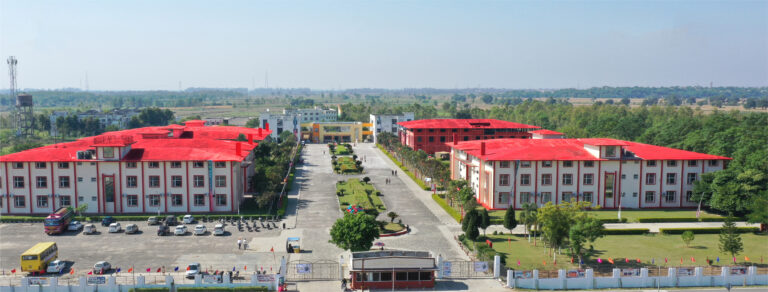
Located in Yelahanka, Bengaluru, REVA University is a prominent private university in Karnataka. Established under the REVA University Act of 2012, it has become a major centre for higher education, offering a wide spectrum of undergraduate, postgraduate, and doctoral programs. The university is recognized for its modern infrastructure, emphasis on research, and industry-aligned curriculum. It is accredited with an ‘A+’ grade by NAAC, a testament to its high standards in academic quality and student support systems.
| University Name | REVA University |
| Location | Yelahanka, Bengaluru, Karnataka, India |
| Accreditation | NAAC ‘A+’ Grade |
| Primary Result Portal | https://rulms.reva.edu.in |
| Official Website | https://www.reva.edu.in/ |
| Login Credential | Student Registration Number (SRN) |
| Result Types | Semester-End, Supplementary, Re-evaluation, Entrance Tests (CET, PET) |
Contacting the Examination Department
For any discrepancies in your result, portal access issues, or questions regarding examination procedures, you can contact the university’s administration.
| Admissions Helpline | +91-80-46966966, +91-96112 01303, +91-90211 90211 |
| Admissions Email | admissions@reva.edu.in |
| Examination Department | For specific exam queries, refer to the official Contact Details page. |
| University Address | REVA University, Rukmini Knowledge Park, Kattigenahalli, Yelahanka, Bengaluru – 560064, Karnataka, India. |
Exam FAQ
- What is SRN and where can I find it?
- SRN stands for Student Registration Number. It is a unique ID assigned to every student upon admission. You can find your SRN on your university ID card, fee receipts, and examination hall ticket. It is the primary credential for checking results online.
- The result portal is not opening. What should I do?
- On result declaration days, the server may experience high traffic. If the RULMS portal is unresponsive, clear your browser cache, try a different browser, or wait for 15-20 minutes. Alternatively, you can check for updates on the official REVA Student Portal mobile app, as results are published there as well.
- I have an ‘F’ grade in a subject. What does this mean?
- An ‘F’ grade indicates failure in that subject. You must appear for a supplementary examination to clear this backlog. Monitor the university’s examination website for the supplementary exam schedule and registration notification.
- How do I apply for a re-evaluation of my REVA University result?
- The university will release a notification on its website with a link to an online application form for re-evaluation. You must fill out the form, select the subjects, and pay the prescribed fee per subject online before the deadline, which is usually within 15 days of result declaration.
- Where can I find the results for the REVA CET entrance exam?
- Entrance exam results like REVA CET are not published on the RULMS student portal. They are announced on the main university website (reva.edu.in), typically under the ‘Admissions’ section. You will need your application number to check your score and rank.
- What is the difference between SGPA and CGPA?
- SGPA (Semester Grade Point Average) is the weighted average of grade points obtained in all courses during a single semester. CGPA (Cumulative Grade Point Average) is the weighted average of grade points obtained in all courses from the first semester up to the current one. CGPA reflects your overall academic performance in the programme.
- My name is misspelled on the grade sheet. How do I correct it?
- You should immediately contact the Office of the Controller of Examinations with valid proof of your correct name (e.g., 10th-grade marksheet, Aadhar card). They will guide you through the correction process. It is crucial to rectify this promptly as it affects your final degree certificate.
- Can I get a physical copy of my marksheet?
- The document available online for immediate download is the official Semester Grade Sheet. The university issues the final, consolidated physical marksheet and the degree certificate after the completion of the entire programme. Students will be notified about the collection process through official circulars.