CBLU Result 2026: Check Chaudhary Bansi Lal University Bhiwani Even & Odd Sem Results at cbluse.ucanapply.com
Chaudhary Bansi Lal University (CBLU), Bhiwani publishes all NEP undergraduate, postgraduate, B.Ed, and on-demand (EOD) re-appear results across two official portals: cbluse.ucanapply.com/declared-results (Smart Exam portal for course-wise declared result lists and student login) and result.cblu.online (where students enter their Registration Number, Aadhaar Number, and Result Type: Main or Reappear), alongside notifications on cblu.ac.in/examination-notice.
CBLU Result 2026: Course-Wise Declaration Dates (July–October 2026) & Direct Links
CBLU Bhiwani has released the May–July 2026 Even Semester (2nd, 4th, 6th Sem), B.Ed Annual, and September 2026 On-Demand (EOD) Re-appear results between July and October 2026:
| Course & Semester Covered | Exam Session | 2026 Declaration Date | Required Login | Direct Portal Link |
|---|---|---|---|---|
| PGDCA 2nd Sem & M.Sc. Computer Science 2nd Sem (Main) | May–June 2026 Exam | Declared on 16 October 2026 | Roll No. / Registration No. | Check PG Result |
| On-Demand (EOD) Re-appear Results (B.Ed 1st/2nd Yr & BA/B.Sc Sem) | September 2026 Exam | Declared on 15 October 2026 | Registration No. + Aadhaar No. | Check EOD Result |
| B.Ed. Regular (2nd Year) & B.Ed. Special Education (HI, LD, ID/MR 1st & 2nd Yr) | June–July 2026 Exam | Declared on 25 Aug & 5 Oct 2026 | Roll No. / Registration No. | Check B.Ed Result |
| B.Sc. (Hons) Agriculture 2nd Sem, BA Fashion Design 2nd Sem & B.Sc Actuarial Sci 4th Sem | May 2026 Exam | Declared on 6 August 2026 | Roll No. / Registration No. | Check UG Spl Result |
| B.A., B.Com & BCA 2nd Sem (Main 2025–29) + B.A. 2nd & 4th Sem Re-appear | May 2026 Exam | Declared on 30 July 2026 | Registration No. + Aadhaar No. | Check BA / BCom / BCA |
| B.A. & B.Com 4th Sem (2024–28), B.Pharm 4th Sem, BBA & B.Sc Life/Physical Sci 2nd Sem | May 2026 Exam | Declared on 21–28 July 2026 | Registration No. + Aadhaar No. | Check 2nd / 4th Sem |
| CBLU Re-evaluation Results (UG & PG Odd/Even Semesters) | 2025–26 Sessions | Updated Batch-Wise | PDF Notification / Roll No. | View Reval Results |
How to Find Your CBLU Registration Number: If you are using result.cblu.online and do not remember your Registration Number, click the built-in “Find Registration No.” link on the sign-in screen to retrieve it by entering your Name and Father’s Name.
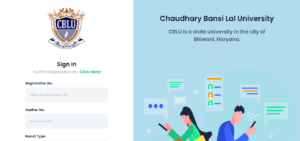
CBLU Results 2025-2026 – Course-wise Details
Undergraduate (UG) Results
| Course | Semester/Year | Exam Session | Result Link |
|---|---|---|---|
| B.Sc (Actuarial Science) | Semester II | May 2025 | Check Result |
| B.Com (Hons.) | Semester IV | May 2025 | Check Result |
| BCA | Semester II, V, VI (Mercy) | May 2025 | Check Result |
| BA | Semester I, III, V | December 2025 | Check Result |
| BSc | Semester I, III, V | December 2025 | Check Result |
| BCom | Semester I, III, V | December 2025 | Check Result |
| BBA | Semester I, III, V | December 2025 | Check Result |
| BCA | Semester I, III, V | December 2025 | Check Result |
| BA (Annual) | Part I, II, III | Annual 2025 | Check Result |
| BSc (Annual) | Part I, II, III | Annual 2025 | Check Result |
Postgraduate (PG) Results
| Course | Semester | Exam Session | Result Link |
|---|---|---|---|
| MBA | Semester II (Backlog), IV (Mercy) | May 2025 | Check Result |
| MSW | Semester IV (Mercy) | May 2025 | Check Result |
| M.Sc (Computer Science) | Semester III (Backlog) | May 2025 | Check Result |
| M.Sc (Physics) | Semester II (Mercy), III (Backlog) | May 2025 | Check Result |
| M.Sc (Psychology) | Semester II (Backlog) | May 2025 | Check Result |
| MA (Journalism & Mass Communication) | Semester IV | May 2025 | Check Result |
| MA (Economics) | Semester I (Mercy) | May 2025 | Check Result |
| MA (Political Science) | Semester III (Mercy) | May 2025 | Check Result |
| MA | Semester I, III | December 2025 | Check Result |
| MSc | Semester I, III | December 2025 | Check Result |
| MCom | Semester I, III | December 2025 | Check Result |
| MBA | Semester I, III | December 2025 | Check Result |
| MCA | Semester I, III | December 2025 | Check Result |
| MA (Previous/Final) | Annual | Annual 2025 | Check Result |
Professional Course Results
| Course | Semester | Exam Session | Result Link |
|---|---|---|---|
| M.Ed (Special ID/MR) | First Year (Backlog) | May 2025 | Check Result |
| M.Ed | Semester I, III (Backlog) | May 2025 | Check Result |
| PGDRP | First Year (Backlog) | May 2025 | Check Result |
| APGDGC | Semester I (Mercy) | May 2025 | Check Result |
| B.Ed | Semester I, III | December 2025 | Check Result |
| M.Ed | Semester I, III | December 2025 | Check Result |
| BPED | Semester I, III | December 2025 | Check Result |
| LLB | Semester I, III, V | December 2025 | Check Result |
Supplementary and Revaluation Results
| Result Type | Applicable Courses | Result Link |
|---|---|---|
| Supplementary Examination Results | All UG/PG Courses | Check Result |
| Revaluation Results | All UG/PG Courses | Check Result |
| Improvement Results | All UG/PG Courses | Check Result |
How to Check CBLU Result
Follow these steps to check your CBLU examination result online:
- Visit the official CBLU examination portal at result.cblu.online/ ( and https://cblu.ac.in/re-evaluation-result/ for revaluation results).
- Click on the Result section or your specific examination result link
- Select your Course, Semester, and Examination Session
- Enter your Roll Number as printed on your Admit Card
- Enter your Date of Birth in the required format
- Click on the Submit or View Result button
- Your result will be displayed on the screen
- Download or print the result for your records
Details on CBLU Marksheet
| Field | Description |
|---|---|
| Student Name | Name as per university enrollment records |
| Father’s Name | Father’s name as per records |
| Roll Number | Examination roll number |
| Registration Number | University registration number |
| Course Name | Program enrolled in |
| Semester/Year | Current semester or year of examination |
| Subject-wise Marks | Marks obtained in each subject (Theory and Practical) |
| Maximum Marks | Total marks for each subject |
| Total Marks | Aggregate marks obtained |
| Percentage | Overall percentage secured |
| Result Status | Pass, Fail, ATKT, or Compartment |
| Division | First, Second, or Third Division (if applicable) |
CBLU Grading System
| Grade | Grade Point | Percentage Range | Description |
|---|---|---|---|
| O | 10 | 90% and above | Outstanding |
| A+ | 9 | 80% to 89.99% | Excellent |
| A | 8 | 70% to 79.99% | Very Good |
| B+ | 7 | 60% to 69.99% | Good |
| B | 6 | 50% to 59.99% | Above Average |
| C | 5 | 40% to 49.99% | Average |
| P | 4 | 33% to 39.99% | Pass |
| F | 0 | Below 33% | Fail |
CBLU Revaluation Process
| Particulars | Details |
|---|---|
| Application Mode | Online through CBLU examination portal |
| Revaluation Fee | Rs. 500 to Rs. 800 per subject (varies by course) |
| Papers Eligible | All theory papers. Practical exams, internal assessment, project report, dissertation, thesis and viva-voce cannot be re-evaluated. The earlier condition of more than 15% marks in the paper was withdrawn by notification dated 20 August 2026. |
| Application Deadline | Within 15-20 days of result declaration |
| Documents Required | Result copy, Fee receipt |
| Result Timeline | 4-6 weeks after application deadline |
| Key Links | Apply at – result.cblu.online/
Results at – https://cblu.ac.in/re-evaluation-result/ |
Steps to Apply for CBLU Revaluation
- Visit CBLU examination portal after result declaration
- Click on Revaluation/Rechecking link
- Enter your Roll Number and other required details
- Select the subject(s) for revaluation
- Pay the revaluation fee online
- Submit the application and save the acknowledgment
CBLU Important Links
| Purpose | Link |
|---|---|
| Official Website | cblu.ac.in |
| Examination Portal | bit.ly/m/cblu |
| Result Page | result.cblu.online/ |
| Admit Card Download | result.cblu.online/ |
| Revaluation Form | cblu.ac.in/forms/ |
| Date Sheet | Click here |
| Notifications | cblu.ac.in |
| DigiLocker | digilocker.gov.in |
CBLU Contact Information
| Contact Type | Details |
|---|---|
| University Address | Chaudhary Bansi Lal University, Bhiwani – 127021, Haryana |
| Phone | 01664-275975 |
| registrar@cblu.ac.in | |
| Examination Branch | controller@cblu.ac.in |
| Website | cblu.ac.in |
FAQs – CBLU Results
Q: How to check CBLU result online?
A: Visit cblu.ac.in/exam.aspx, select your examination, enter roll number and date of birth, then click submit to view your result.
Q: What credentials are required to check CBLU result?
A: You need your Roll Number (as printed on your Admit Card) and Date of Birth to check your result on the CBLU portal.
Q: What is the passing percentage in CBLU examinations?
A: The minimum passing marks in CBLU is 33% in each subject and 33% in aggregate for most undergraduate courses. Some professional courses may have higher passing criteria.
Q: How to apply for CBLU revaluation?
A: Apply online at cblu.ac.in/exam.aspx within 15-20 days of result declaration. Pay the required fee (Rs. 500-800 per subject) and submit your application online.
Q: When will CBLU original marksheet be available?
A: Original marksheets are usually available 4-8 weeks after result declaration. Students can collect them from their respective colleges or the university examination branch.
Q: What does ATKT mean in CBLU result?
A: ATKT means Allowed To Keep Terms. Students with ATKT can attend the next semester classes while appearing for the backlog examination in failed subjects.
Q: Can I get CBLU marksheet on DigiLocker?
A: Yes, CBLU marksheets are available on DigiLocker. Students can access their verified digital marksheets through digilocker.gov.in using their credentials.
Q: What if my roll number is not found on CBLU result portal?
A: First verify that you have selected the correct examination session and course. If the issue persists, contact your college examination cell or CBLU examination branch at controller@cblu.ac.in.
Q: How long does CBLU take to declare results?
A: CBLU typically declares results within 4-8 weeks after the completion of examinations. The exact timeline varies depending on the course and number of students.
Q: Can I apply for CBLU supplementary examination online?
A: Yes, supplementary examination forms are available online on the CBLU examination portal. Students who fail or want to improve their marks can apply during the specified window.