UP Scholarship OTR Registration 2025-26: Step-by-Step Guide
UP OTR Scholarship is a 5 minute mandatory registration process at UP Scholarship Portal. Find the complete OTR process in this step-by-step guide.
The One Time Registration (OTR) on the Uttar Pradesh Scholarship portal is a foundational step for accessing Pre-Matric, Post-Matric, and Dashmottar schemes in the 2025-26 academic year. Managed by the Social Welfare Department at https://scholarship.up.gov.in/, OTR creates a unique profile for applicants, streamlining future applications and renewals. As of December 5, 2025, OTR remains open for Dashmottar submissions, while Pre/Post-Matric users use existing registrations for verifications.
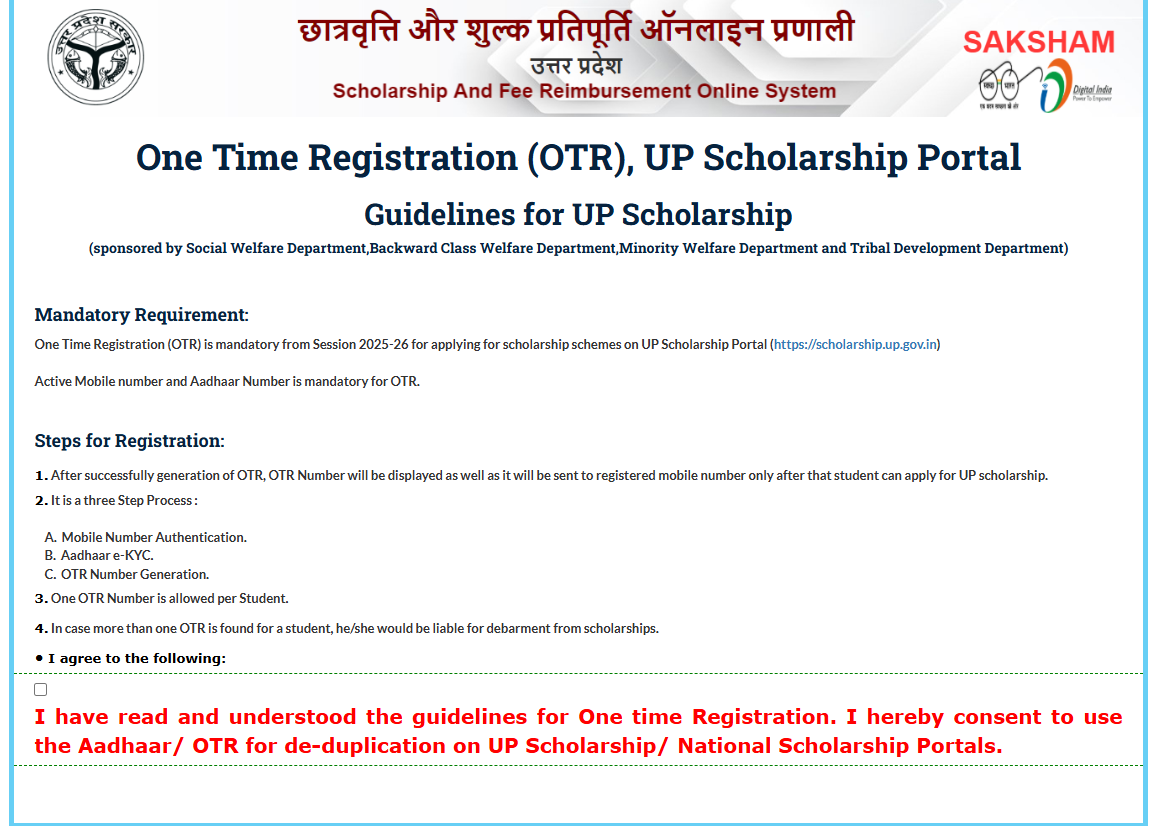
OTR is mandatory for fresh applicants and optional for renewals if credentials are retained. It verifies identity via Aadhaar, ensuring secure access to benefits worth billions annually. This process, introduced to curb duplicates, processes over 2 million registrations yearly, with 2025-26 focusing on digital efficiency amid rising enrollments.
Latest Updates on UP Scholarship OTR Registration
| Registration Type | Category | Status as of December 5, 2025 | Key Deadline | Access Link |
|---|---|---|---|---|
| Fresh OTR | Pre-Matric | Completed for 2025-26 | N/A – Use for Status | https://scholarship.up.gov.in/RegistrationNew.aspx |
| Fresh OTR | Post-Matric | Completed for 2025-26 | N/A – Use for Status | https://scholarship.up.gov.in/RegistrationNew.aspx |
| Fresh/Renewal OTR | Dashmottar | Open | December 20, 2025 | https://scholarship.up.gov.in/Popup.aspx |
| OTR Component | Expected Update | Status as of December 5, 2025 | Next Action | Access Link |
|---|---|---|---|---|
| Pre-Matric OTR Verification | December 15, 2025 | Awaited | Check Portal | https://scholarship.up.gov.in/LoginStudentPreFresh.aspx |
| Post-Matric OTR Linking | December 20, 2025 | Awaited | Update if Needed | https://scholarship.up.gov.in/LoginStudentPostInter.aspx |
| Dashmottar OTR Completion | January 10, 2026 | Open | Register Now | https://scholarship.up.gov.in/Popup.aspx |
| Event | Date | Details | Access Link |
|---|---|---|---|
| OTR Portal Opening | July 2, 2025 | For All Categories | https://scholarship.up.gov.in/Popup.aspx |
| Pre/Post-Matric OTR Cutoff | October 30, 2025 | Linked to Application | https://scholarship.up.gov.in/RegistrationNew.aspx |
| Dashmottar OTR Last Date | December 20, 2025 | Ongoing Registrations | https://scholarship.up.gov.in/Popup.aspx |
| OTR Verification Phase | December 31, 2025 | Aadhaar Integration | https://scholarship.up.gov.in/status2526.aspx |
How to Complete UP Scholarship OTR Registration: Step-by-Step
Fresh OTR Registrations
OTR registration is quick, taking 10-15 minutes, and is prerequisite for scholarship forms. This guide ensures error-free setup.
- Access OTR Portal: Visit https://scholarship.up.gov.in/. Click ‘One Time Registration’ or direct to https://scholarship.up.gov.in/Popup.aspx. Select your department: Social Welfare, Backward Class, or Minority Welfare based on category.
- Enter Basic Details: Provide Aadhaar number, name as per Aadhaar, date of birth, gender, and mobile/email. Ensure UP domicile proof readiness. System validates Aadhaar via UIDAI for authenticity.
- Upload Photograph: Scan and upload a passport-size photo (JPEG, <50KB) meeting specs: white background, 3.5×4.5 cm. Signature upload optional but recommended for forms.
- Fill Address and Academic Info: Input permanent address, school/college details, and category (SC/ST/OBC/General). For Dashmottar, add course level. Verify against documents to avoid mismatches.
- Create Login Credentials: Set username (email/mobile) and strong password. Generate OTP on registered mobile for verification. This yields a unique 12-digit registration number—save it securely.
- Submit and Confirm: Review preview, submit. Receive confirmation SMS/email with registration number. Login at https://scholarship.up.gov.in/ to access dashboard for applications.
- Troubleshoot Issues: If Aadhaar fails, use virtual ID or enrollment slip. For duplicates, contact helpline 0522-2237498. Renewals skip full OTR but update via login.
Post-OTR, link bank account via PFMS for DBT. Common errors: photo format (resolve by resizing tools) or mobile mismatch (update via NPCI). In 2024-25, 95% OTRs succeeded on first try, boosting approvals.
Renewal Login
Students who have already received the UP Scholarship in the previous academic year must apply through the renewal process instead of filling a fresh application form. Renewal applicants need to log in with their previous registration details, update their academic information, and submit the form within the prescribed deadline.
- Visit the official UP Scholarship portal at scholarship.up.gov.in.
- Click on the Student section on the homepage.
- Select the Renewal Login option for the relevant academic year.
- Choose your scholarship category, such as Pre-Matric, Post-Matric, or Dashmottar.
- Enter your previous year’s registration number, date of birth, password, and captcha code to log in.
- Complete the OTR requirement, if applicable, by entering or linking your One Time Registration (OTR) number.
- Check the pre-filled details in the renewal form and update your current academic information, such as class/course, institution, and marks obtained in the previous examination.
- Upload the required supporting documents, if asked, and verify that your Aadhaar and bank details are correct.
- Review the application carefully and click on Submit.
- Download and print the submitted renewal application form for future reference.
- Submit the hard copy to your school/college/institution, if required by the scholarship authority or institution.
How to Retrieve Forgotten UP Scholarship OTR Number
Students who have completed UP Scholarship OTR registration but forgotten their OTR number can retrieve it online through the official scholarship portal by following these steps.
- Visit the official UP Scholarship portal: UP Scholarship Portal
- On the homepage, click on the Student section.
- Select the New Registration option.
- Choose the appropriate scholarship category and application type (for example, Pre-Matric or Post-Matric, Fresh or Renewal).
- On the next page, click “If you Forget your OTR Number? Click Here”.
- Enter your registered mobile number and the captcha code shown on the screen.
- Click on Retrieve OTR / OTR पुनः प्राप्त करें to get your OTR number.
- Once displayed, note down your OTR number carefully for future scholarship login, application, status check, and renewal use.
Full List of OTR Requirements by Category
OTR adapts to schemes, with core fields universal. Below table outlines specifics for 2025-26, aiding preparation across programs.
| Category | Key OTR Fields | Required Documents | Eligibility Check | Notes |
|---|---|---|---|---|
| Pre-Matric | Aadhaar, Class 9/10 enrollment | Photo, Aadhaar, domicile cert | UP resident, Class 8/9 pass | Family income < INR 2 lakh |
| Post-Matric | Aadhaar, Class 11/12 details | Photo, mark sheet, caste cert | UP resident, Class 10 pass | Stream-specific (Arts/Science) |
| Dashmottar UG | Aadhaar, degree enrollment | Photo, 12th marks, fee receipt | UP resident, 50% in 12th | Open for BA/BSc/BCom |
| Dashmottar PG | Aadhaar, PG admission proof | Photo, UG degree, income cert | UG graduate, merit-based | MA/MSc/MCom focus |
| Dashmottar Tech | Aadhaar, entrance score | Photo, JEE/CLAT scorecard | Qualified exam, UP quota | BTech/MBA/LLB |
| Dashmottar Diploma | Aadhaar, ITI/poly enrollment | Photo, 10th cert, skill proof | 10th pass, vocational | Short-term courses |
This covers 15+ programs, with OTR enabling tailored applications. For reserved categories, upload certificates during OTR for auto-quota. Updates post-registration require login edits before deadlines.
OTR integration with Samagra ID verifies academics, reducing fraud. Dashmottar OTRs surged 25% in 2025, reflecting higher ed demand. Ensure JavaScript-enabled browser for seamless upload.
Eligibility Criteria for UP Scholarship OTR Registration
Students must meet certain basic conditions before completing the UP Scholarship OTR (One Time Registration) process. Based on the details shared on the UP Scholarship guide portal, the eligibility criteria are as follows:
- The applicant must be a permanent resident of Uttar Pradesh.
- The student must be studying in an eligible class or course, such as Class 9, Class 10, Class 11, Class 12, UG, PG, diploma, or other recognised post-matric courses.
- The applicant should have passed the previous qualifying class or year before applying for the scholarship.
- A valid Aadhaar card is required for OTR registration and eKYC verification.
- The student must have an active mobile number linked with Aadhaar, as OTP verification is required during OTR generation.
- The applicant should have a bank account linked with Aadhaar, since scholarship benefits are transferred directly to the bank account.
- The student must fall within the prescribed family income limit under the UP Scholarship scheme:
- SC/ST students: up to ₹2.5 lakh per annum
- General/OBC/Minority students: up to ₹2 lakh per annum
- The application and OTR process must be completed through the online UP Scholarship portal only.
Documents Required for UP Scholarship OTR Registration
To complete UP Scholarship OTR (One Time Registration), students must keep a few basic documents and details ready for Aadhaar-based verification and final OTR generation. As listed on the UP Scholarship guide portal, the required documents/details are:
- Aadhaar card of the applicant
- Aadhaar-linked mobile number for OTP verification
- Basic personal details such as the student’s name and date of birth
- School or college certificate/details for the final OTR step
- Parents’ details, especially father’s name and mother’s name
- Email ID for completing the final OTR submission
- DigiLocker access / eKYC verification details, since Aadhaar eKYC is part of the OTR process
How to Check My UP Scholarship Status?
Students can check their UP Scholarship status online through the official Uttar Pradesh scholarship portal using their registration number and date of birth. Here’s how:
- Visit the official UP Scholarship portal: scholarship.up.gov.in.
- On the homepage, click on the “Status” option.
- Select the relevant academic year for which you applied.
- Enter your registration number and date of birth in the required fields.
- Click on Search to view your scholarship application status.
- The screen will show whether your application is pending verification, approved, rejected, or disbursed.
- Download or save the status slip for future reference.
OTR Guidelines and Support
- Guidelines mandate accurate data; falsification invites penalties under IT Act. As of December 5, 2025, OTR demands 100% Aadhaar linkage for disbursements. Maintain 75% attendance post-registration for eligibility.
- Support: Helpline 0522-2237498 (10 AM-6 PM), email help-otr-up@gov.in. FAQ at https://scholarship.up.gov.in/OtherInformation.aspx covers 90% queries. Grievance module at https://scholarship.up.gov.in/Grievance.aspx resolves in 48 hours.
- District helpdesks in Lucknow/Kanpur offer in-person aid. Technical: Clear cache for errors; use desktop for uploads. Inclusivity: Voice-assisted OTR for disabled via app.
- Audits ensure 98% verification rate. Link OTR to DigiLocker for auto-fills. December camps educate on processes, targeting 500k users.